
Photo guide
How to photograph rooms for virtual staging
Short answer
Take wide, level photos of each room in daylight, from every angle worth showing, standing just off a corner with the floor in view, and send us the original files. Each finished photo keeps the light, angle and sharpness of the one you send.
R449 per listing, no subscription. Photos usually back within 24 hours.

What a good photo looks like
Four photos from one real listing, each beside the mistake that would have spoilt it. A phone is enough; what matters is light, a level frame, the floor and focus.
-
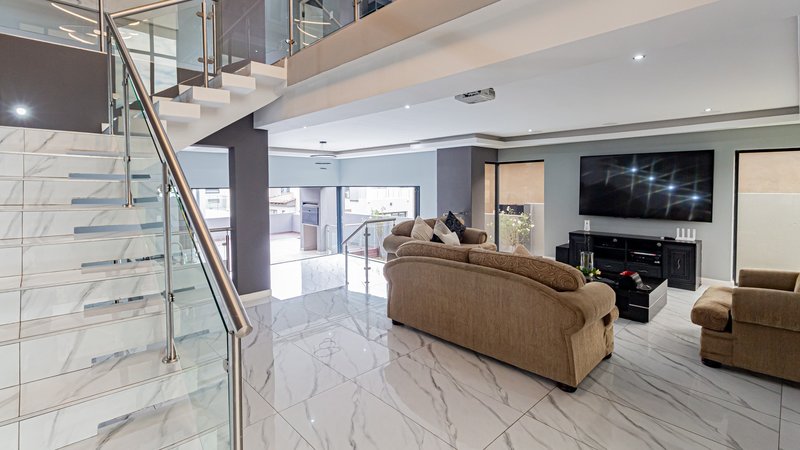
Like this Level: stair rails and door frames stand straight.
Not like this Tilted: walls lean and the room looks smaller. Hold the phone level and let the ceiling go. -
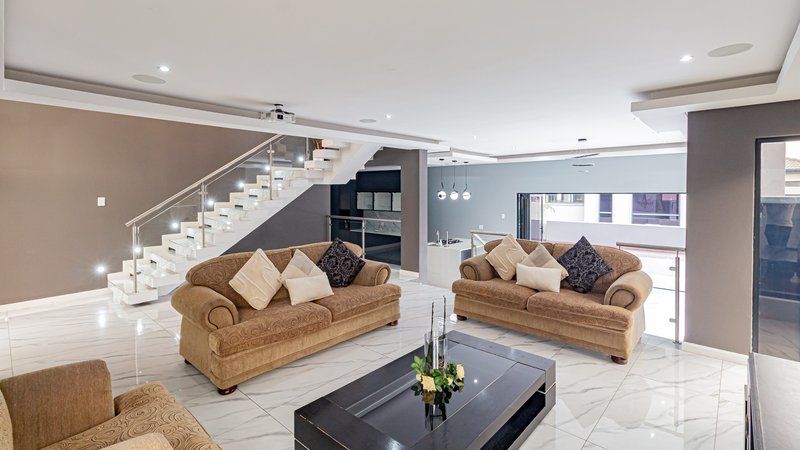
Like this Daylight with the curtains open: every corner holds detail.
Not like this Too dark: detail a camera never recorded cannot be brought back. If the power is off, wait for daylight rather than shooting under backup lights. -
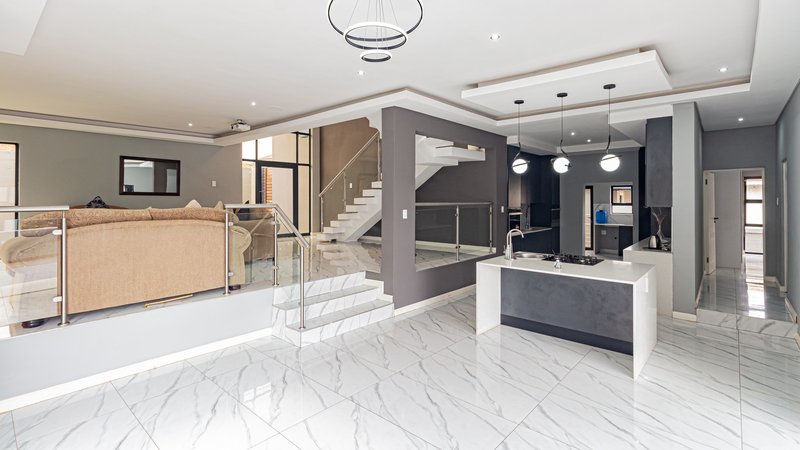
Like this Plenty of floor: somewhere for the furniture to stand.
Not like this Mostly ceiling: with the floor cut away there is little to furnish. -
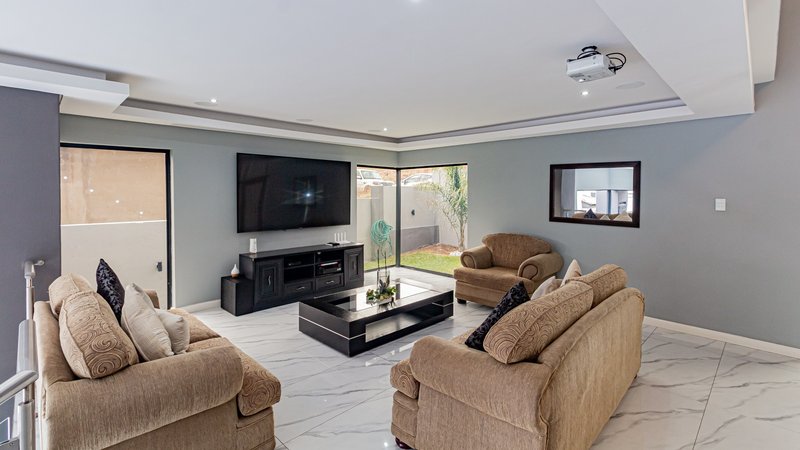
Like this Sharp throughout. Brace your arm and tap the room on screen to focus.
Not like this Blurred: the one fault nothing can rescue. Sharpening afterwards only adds halos, so check each photo before you leave.
Every photo here is from a real listing we delivered, shown with the agent's permission. The “not like this” versions are the same photos, altered by us to show each fault.
Nine checks before you send
Run through these on site. Each takes seconds.
-
Shoot in daylight, with curtains and blinds open
Detail lost in a dark corner cannot be brought back later by any amount of editing. Daylight first; add lamps only if the room still reads dim.
-
Hold the phone level, at about chest height
Level keeps walls and door frames straight. Chest height shows the room the way a buyer standing in it would see it.
-
Stand inside the room, just off a corner
Corners show the most floor and the true shape of the room. A photo taken through the doorway cannot be furnished convincingly.
-
Get three walls in the frame
Three walls tell us the true size and proportions of a room, which a flat two-wall view cannot. They also give our team more surfaces to work with, so the finished room is furnished rather than just filled.
-
Show the floor
Furniture has to stand on something. The more floor a photo shows, the more convincing the finished room; a frame that is mostly wall or ceiling gives our team very little to work with.
-
Landscape, not portrait
South African portals are built for wide photos, and a wide frame leaves room to furnish.
-
Brace your arm against a wall, and tap the screen to focus
Blur is the one fault nothing can rescue. Out-of-focus photos stage poorly, so check each one before you send.
-
Turn HDR on when a window is in frame
HDR keeps the view through the glass. A white, blown-out window can only partly be recovered, and only from detail the photo actually captured.
-
Send original files, with nobody in the room
WhatsApp compresses photos heavily, so upload originals or share them by email or file link. And photograph rooms empty of people: to protect privacy we do not stage photos with people in them.
Where should I stand?
Inside the room, just off a corner, with the phone level at about chest height. Send every angle of each room: each comes back staged with the same furniture. Make sure at least one photo shows the whole space. Step into the room rather than shooting through the doorway.
Which rooms are worth staging?
Bedrooms, living rooms, dining rooms, studies, entrance halls and covered patios respond best: they are the empty spaces buyers struggle to picture furnished. Kitchens and bathrooms are already fitted, so they get styling and enhancement rather than furniture, and gardens, exteriors and pools are enhanced only. Photograph every room anyway: a complete set helps buyers trust the listing. The before and after examples show how finished rooms look.
How do open-plan rooms work?
Send every angle of the space. A wide photo showing the zones together sets the furniture plan, and the other angles come back staged with the same pieces. Stand where the living, dining and kitchen zones read as one space, usually from the corner that faces down the length of the room.
What resolution or file do you need?
The original photo your phone saved. What hurts is compression on the way to us: a photo forwarded through WhatsApp arrives at a fraction of its size, so upload originals or share them by email or file link. We like about 1,200 pixels or more on the long side, which every recent phone produces comfortably.
For reference, Property24 and HelloHouse recommend listing images of 1024 by 768 pixels or larger (their guidance, as read on 2026-08-11).
What if the room has furniture or people in it?
Furniture is workable; people are not. An occupied room can be decluttered and refurnished, but furniture hides the floor, so clear what you can first. To protect privacy, photos that show a person are not staged, and a framed photograph of a person on a wall or shelf counts: put family photos away or out of frame.
Photo questions, answered
Is my phone camera good enough for virtual staging?
Should listing photos be portrait or landscape?
How many photos of each room should I take?
Can I send photos over WhatsApp?
Why was one of my photos not furnished?
Do you work on every photo I send?

Stage your next listing
Shoot the checklist, send the originals, and see the difference on a real listing. Photos and description usually back within 24 hours.
R449 per listing, no subscription. Photos usually back within 24 hours.
Still deciding who should do the staging? Do it yourself, or done for you?